Smart locks with fingerprint access make everyday entry faster by replacing keys with biometric recognition, PIN codes, apps, and—on some models—remote control. The best choice depends on your door, connectivity needs, household access, and installation requirements.
We compared 10 fingerprint-enabled locks across deadbolts, handle sets, and interior-friendly door knobs to help you choose a secure, convenient option for your home or rental property.
Best 10 Smart Locks with Fingerprint Picks for 2026
Best Wi-Fi Pick

- Built-in Wi-Fi and Wyze app control
- AI-learning fingerprint scanner
- Up to 8 months of battery life
Best For: Connected home entry with multiple backup unlocking options
Best Budget-Friendly Option
TEEHO TE002 Fingerprint Deadbolt

- Stores 20 fingerprints and 20 passcodes
- One-time PINs and anti-peep keypad
- No app or remote connectivity required
Best For: Flexible local access for families, guests, or rentals
Best for Interior Doors
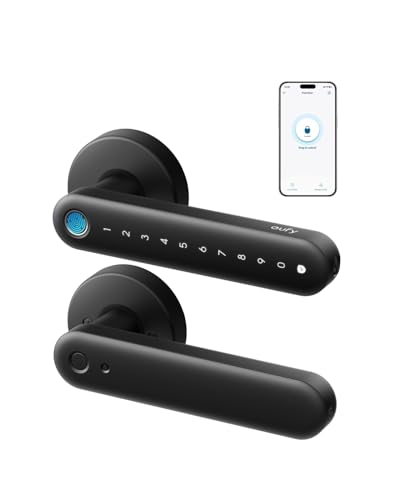
- 0.3-second fingerprint unlocking
- Built-in Wi-Fi with remote management
- Alexa and Google Assistant support
Best For: Interior rooms, offices, storage areas, and garage entries
Best for Access Management
Veise VE017 Fingerprint Smart Lock

- Remote user permissions and activity logs
- Under-0.2-second fingerprint recognition
- Multiple code types and local AES-128 storage
Best For: Rentals, multi-tenant properties, and changing guest access
Best Connected Pick

- Built-in Wi-Fi with remote app control
- Six unlocking methods, including fingerprint
- Up to eight months of battery life
Best For: Homeowners wanting bridge-free remote access
Best for Everyday Use

- Five unlocking methods with biometric entry
- Stores up to 100 fingerprints and 50 passwords
- USB-C emergency power backup
Best For: Bedrooms, offices, and rental properties
Best Battery Endurance
DESLOC B200 Fingerprint Smart Lock

- Up to 12 months of battery life
- Seven access methods for flexible entry
- USB-C backup and temporary access codes
Best For: Front doors needing long runtime and shared access
Best Family & Rental Pick
Sifely Fingerprint Handle Lock

- Fingerprint, keypad, app, fob, key-card, and key entry
- Guest-code creation and access logs through the app
- Optional gateway adds remote and voice control
Best For: Families, Airbnb hosts, and rental properties
Best Built-In Wi-Fi Pick
Philips 4200 Series Fingerprint Lock

- Direct 2.4GHz Wi-Fi connection without a hub
- Claimed 0.3-second fingerprint access and flexible PIN codes
- Matching handle set with app, remote, and voice control
Best For: Front-door, office, and rental-property upgrades
Best Wi-Fi Pick – WYZE Auto-Lock Bolt v2
For shoppers comparing smart locks with fingerprint access, the WYZE Auto-Lock Bolt v2 stands out with built-in Wi-Fi, an AI-learning scanner, and several backup entry methods. Its fingerprint reader unlocks in about 0.5 seconds, while the Wyze app supports remote lock management.
Best For: Homeowners who want fingerprint entry plus remote app control and long battery life.
Pros:
- AI-learning fingerprint scanner with scratch- and smudge-resistant tempered glass
- Built-in Wi-Fi enables remote monitoring and control through the Wyze app
- Up to eight months of battery life, with USB-C emergency power backup
- Supports fingerprints, app control, codes, and physical backup keys
Cons:
- Uses eight AA batteries, which may add weight and replacement cost
- Remote features are tied to the Wyze app ecosystem
This is a flexible deadbolt for buyers who value connected features without giving up keypad or key access. The AI-learning scanner and emergency USB-C power option add useful everyday convenience.
Best Budget-Friendly Option – TEEHO TE002 Fingerprint Deadbolt
The TEEHO TE002 is a straightforward choice among smart locks with fingerprint access, combining biometric entry with a keypad, physical keys, and one-time PINs. It is designed for standard U.S. doors and installs with a screwdriver without drilling.
Best For: Families, renters, and households that need flexible access without app connectivity.
Pros:
- Stores up to 20 fingerprints and 20 passcodes
- Fingerprint recognition takes about 0.3 seconds, with unlocking in about one second
- Offers auto-lock, one-touch locking, anti-peep codes, silent mode, and away mode
- IP54 weather resistance, BHMA Grade 3 certification, and a two-year warranty
Cons:
- Four AA batteries are required but not included
- Nonconnected design does not provide remote app management
- Fits 2-1/8-inch door holes only
Choose the TE002 if you want biometric convenience and strong local access controls rather than cloud features. Its one-time PINs and vacation mode are especially useful for guests, rentals, and temporary access.
Best for Interior Doors – eufy FamiLock C32
The eufy Security FamiLock C32 is a lever-style option for shoppers seeking smart locks with fingerprint access for interior spaces. Its large fingerprint array unlocks in about 0.3 seconds, and built-in Wi-Fi enables remote management through the connected system.
Best For: Bedrooms, offices, storage areas, garages, and other interior doors.
Pros:
- Large-area fingerprint reader with 360-degree recognition
- Self-learning algorithm supports multiple users, including children and seniors
- Built-in 2.4 GHz Wi-Fi enables remote authorization and management
- Works with Alexa and Google Assistant and includes USB-C emergency backup
Cons:
- Not recommended for front-door use
- Four AA batteries last over five months, shorter than some listed alternatives
- Rekeying is not supported
The C32 makes the most sense when you need convenient keyless access inside the home rather than a traditional exterior deadbolt. Its lever design and quick installation are well suited to offices, bedrooms, and storage doors.
Best for Access Management – Veise VE017 Fingerprint Smart Lock
The Veise VE017 is built for shoppers who want smart locks with fingerprint access and detailed user administration. Through the KK Home App, owners can assign, pause, or delete permissions remotely while reviewing activity logs for property access.
Best For: Multi-tenant properties, rentals, and households managing frequent or changing users.
Pros:
- Fingerprint recognition claims unlocking in under 0.2 seconds
- Supports fingerprints, app access, fobs, codes, voice assistants with the required G1 Gateway, and a mechanical key
- Offers one-time, duration, permanent, and recurring password options
- Stores access data locally with AES-128 encryption and provides event alerts
Cons:
- Alexa and Google Assistant compatibility requires the G1 Gateway
- Some advanced access-management features depend on the KK Home App
- The supplied notes do not specify the complete battery-life figure
The VE017 is a strong fit when access control matters as much as fingerprint entry. Its permission management, activity logs, temporary codes, and local data storage are particularly useful for properties with multiple users.
Best Connected Pick – eufy Security Smart Lock C220
The eufy Security Smart Lock C220 is a strong all-around choice among smart locks with fingerprint access. It combines fast fingerprint entry with built-in Wi-Fi, app control from anywhere, voice assistants, and several backup unlocking methods. Its standard-deadbolt compatibility and no-drill installation also make it practical for many front doors.
Best For: Homeowners who want fingerprint access plus remote control without adding a separate bridge.
Pros:
- Six unlocking methods, including fingerprint, app, keypad, physical key, Apple Watch, and voice control.
- Built-in Wi-Fi enables remote control through the eufy Security app without a bridge.
- Up to eight months of battery life, self-learning fingerprint recognition, and BHMA Grade 3 certification.
- Fits most standard deadbolts and can be installed in about 15 minutes without drilling.
Cons:
- Requires eight AA batteries, and actual battery life varies with usage.
- Some ecosystem features are most useful for households already using eufy devices.
The C220 stands out when convenient fingerprint entry and reliable remote access matter equally. Its integrated Wi-Fi and broad unlocking options make it one of the most versatile choices in this group.
Best for Everyday Use – Fingerprint Smart Door Handle
Fingerprint Door Lock - Smart Door Handle with Keypad, Biometric Door Knob for Bedroom, Home Office
Check Price On AmazonThis fingerprint smart door handle is designed for bedrooms, home offices, and other standard residential doors rather than a traditional deadbolt setup. It offers biometric entry alongside passwords, IC cards, app control, and mechanical keys, with capacity for up to 100 fingerprints and 50 passwords.
Best For: Bedrooms, offices, and rental properties needing a fingerprint-enabled handle with flexible access options.
Pros:
- Five access methods include fingerprint, password, IC card, app control, and mechanical keys.
- Supports up to 100 fingerprints and 50 passwords, useful for shared spaces or rentals.
- Large sensor is designed for improved recognition, including dry or elderly fingerprints.
- DIY installation fits common US door sizes and requires only a screwdriver.
Cons:
- Four AAA batteries are required but are not included.
- It is a door handle design, so it may not suit doors that require a deadbolt replacement.
- Remote emergency power depends on using a power bank through the USB-C port.
Choose this model when you want fingerprint access on an interior-style handle and need substantial user capacity. Its emergency USB-C power option and multiple backups help reduce lockout concerns.
Best Battery Endurance – DESLOC B200 Fingerprint Smart Lock
The DESLOC B200 is a fingerprint deadbolt for shoppers who prioritize long battery life and flexible household access. It supports fingerprints, PINs, app control, eKeys, key fobs, physical keys, and voice control, while its Bluetooth connection supports TTLock app management nearby.
Best For: Front-door users seeking extended battery life, temporary codes, and multiple keyless entry options.
Pros:
- Offers seven access methods, including fingerprint, PIN, app, eKeys, key fobs, keys, and voice control.
- Self-learning fingerprint recognition unlocks in under 0.3 seconds and supports up to 50 fingerprints.
- Up to 12 months of battery life, plus low-battery alerts and USB-C emergency power.
- DIY installation, IP54 water resistance, and BHMA Grade 3 compliance.
Cons:
- Four AA batteries are required but not included.
- Voice control and some remote functions require the separately sold G2 Gateway.
- Bluetooth app management is intended for close-range use without that gateway.
The B200 is a practical pick for households that want many access choices without frequent battery changes. Check the gateway requirement carefully if remote or voice control is a priority.
Best Family & Rental Pick – Sifely Fingerprint Handle Lock
If you want smart locks with fingerprint access for a busy household or rental property, this Sifely model offers several entry methods in one handle-style design. Fingerprint, keypad, app, key-card, fob, and physical-key access give family members and guests flexible ways to enter.
Best For: Families, kids, elderly users, Airbnb hosts, and rental-property managers who want flexible access control.
Pros:
- Supports fingerprint, passcode, app, fob, key-card, and mechanical-key entry.
- Can generate guest codes and review access records through the app.
- Designed for DIY installation on many standard doors, with a reversible handle.
- Optional Sifely WiFi Gateway enables remote access and Alexa or Google Assistant compatibility.
Cons:
- Remote access and voice control require the optional WiFi Gateway.
- The lock is listed with a one-year manufacturer warranty.
This is a versatile choice when multiple household members or guests need different entry options. Its main limitation is that the most advanced remote and voice features depend on an additional gateway.
Best Budget Knob Option – Tuya Fingerprint Door Knob
This Tuya-connected model is a compact option among smart locks with fingerprint access, combining biometric entry with passcodes, NFC cards, app management, and a mechanical key. Its knob-style design is intended for compatible wooden doors and can be installed without drilling or wiring.
Best For: Indoor bedroom, apartment, or compatible front-door users who want app-based access management in a simple knob format.
Pros:
- Offers fingerprint unlocking with claimed 0.5-second biometric access.
- Supports app management, temporary or permanent codes, entry logs, NFC cards, and a mechanical key.
- Includes auto-lock and silent-mode settings in the app.
- Designed for reversible, no-drill installation on 1.18- to 1.97-inch wooden doors.
Cons:
- Wi-Fi and voice control require a gateway, which is not included.
- Before first use, an administrator fingerprint must be registered; otherwise, any fingerprint can unlock the lock.
- It is specified for indoor use and compatible doors within the stated thickness range.
This lock suits shoppers prioritizing straightforward installation and multiple local entry methods. Carefully complete administrator setup before use and verify door compatibility, particularly if considering it for a front door.
Best Built-In Wi-Fi Pick – Philips 4200 Series Fingerprint Lock
For shoppers seeking smart locks with fingerprint access and built-in connectivity, the Philips 4200 Series connects directly to 2.4GHz Wi-Fi without a separate hub. It combines fingerprint and keypad entry with app control, voice-assistant support, remote status checks, and a matching handle set.
Best For: Front-door upgrades for households, offices, and rental properties that want direct Wi-Fi access and detailed code management.
Pros:
- Built-in 2.4GHz Wi-Fi enables remote app control without an extra hub.
- Provides claimed 0.3-second fingerprint unlocking and supports multiple fingerprints.
- Supports permanent, one-time, periodic, and recurring passcodes.
- Includes auto-lock settings from 0 to 180 seconds and Alexa or Google Assistant compatibility.
Cons:
- Requires eight AA alkaline batteries, which are not included.
- Compatibility is specified for doors 1-3/8 to 1-3/4 inches thick.
- Installation requires following the activation and installation instructions, including holding the reset button for five seconds.
This is the strongest fit for buyers who want remote access without purchasing a separate gateway. Confirm the door thickness and plan for the required batteries before installation.
How We Picked These Smart Locks with Fingerprint Access
We focused on locks that offer fingerprint entry as a primary feature, then considered the access methods that make a lock practical in daily use. The comparison includes deadbolts, lever or handle designs, and knob-style models for different door types and locations.
We also looked at connectivity, app features, keypad access, remote management, backup entry, installation style, and likely use cases such as family homes, apartments, bedrooms, Airbnb properties, and rental units. Because specifications can vary by version, verify door compatibility, battery requirements, and included hardware before ordering.
Quick Comparison
| Best For | Look For |
|---|---|
| Front-door security | Deadbolt construction, reliable backup access, and weather-appropriate hardware |
| Smart-home integration | Wi-Fi or a compatible hub, app control, and voice-assistant support |
| Families and frequent users | Multiple fingerprint profiles, passcodes, and straightforward enrollment |
| Rentals and Airbnb | Remote access, temporary codes, activity logs, and easy code management |
| Bedrooms and offices | Handle or knob form factors with simple local fingerprint entry |
Key Buying Factors for Smart Locks with Fingerprint
Door Type and Fit
Confirm whether you need a standalone deadbolt, a full handle set, a lever, or a knob. Measure your backset, door thickness, borehole, and clearance before buying. A fingerprint lock designed for an interior knob may not provide the same protection as a front-door deadbolt.
Connectivity and Remote Control
Bluetooth-only models generally work nearby, while Wi-Fi-enabled locks can support remote unlocking, notifications, and access management from anywhere. Some locks require a separate hub. If you want voice control or smart-home automation, check compatibility with your preferred platform rather than assuming it is included.
Access Methods and Backup Entry
Fingerprint recognition is convenient, but fingerprints can fail because of moisture, dirt, gloves, or sensor limitations. Choose a model with dependable keypad entry, physical keys, app access, or another backup method. Consider how many fingerprints and passcodes it stores and whether temporary codes can be created.
Power, Security, and Privacy
Review battery life, low-battery alerts, emergency power options, and the lock’s resistance to forced entry. Use strong account credentials and enable two-factor authentication when available. Keep firmware and the companion app updated.
Who Should Buy Which Smart Locks with Fingerprint?
Choose a Wi-Fi deadbolt if you want remote control, notifications, or integration with a connected home. A handle or lever model is better when replacing the entire exterior hardware set. For a bedroom, office, or other interior door, a compact knob-style fingerprint lock may be simpler and less expensive.
Families should prioritize multiple user profiles and quick keypad access. Hosts and landlords should look for temporary passcodes, remote administration, and activity history. If you mainly want fast key-free entry without internet dependence, prioritize a model with local fingerprint and PIN operation, strong battery alerts, and a reliable physical-key backup.