Choosing a commercial smart lock means balancing security, convenient entry, employee access, and long-term maintenance. The right model depends on your door type, traffic level, connectivity needs, and whether you need audit-ready access records.
We compared 10 commercial and light-commercial keypad, RFID, fingerprint, Wi-Fi, and electronic lever locks to help businesses narrow the field quickly.
Best 10 Commercial Smart Locks for Businesses Picks for 2026
Best Commercial-Grade Pick

- Fire-rated for commercial doors
- Remote LocklyOS administration
- Fingerprint, RFID, and PIN access
Best For: Commercial properties needing certified doors and scalable credential management
Best Hub-Free Option

- Direct 2.4GHz Wi-Fi connection
- Flexible PIN and fingerprint access
- Handle set included
Best For: Small offices and rental spaces wanting simple remote access
Best for Multi-Property Access

- Built for commercial environments
- Wi-Fi, Bluetooth, and offline ReadyPINs
- Supports multiple credential types
Best For: Facility managers overseeing offices, rentals, retail, and multi-family properties
Best Familiar Brand Option
Schlage Encode Smart WiFi Lever

- Remote app control over built-in Wi-Fi
- Manages up to 100 access codes
- Reversible lever with alarm features
Best For: Small businesses wanting simple installation and familiar smart-lock controls
High-Traffic Keypad Pick
Kwikset SmartCode 955 Kingston

- 30 user codes plus a one-time code
- 500,000-cycle testing and Grade 2 BHMA certification
- Three-year stated battery life with auto-lock and tamper alert
Best For: Busy small-business entryways and public restrooms
Offline NFC Access Pick

- Unlocks with phones, NFC stickers, or keycards
- App manages users, guests, and keycards
- No internet connection, wiring, or recurring fees
Best For: Local access control for small businesses and rentals
Flexible Standalone Access
Hicarer Commercial Keypad Lever Lock

- Code, card, and backup-key entry
- No Wi-Fi, app, subscription, or account
- Reversible lever for either door handing
Best For: Shared doors needing flexible local access
Automatic Relocking
Schlage Camelot Keypad Lever Lock
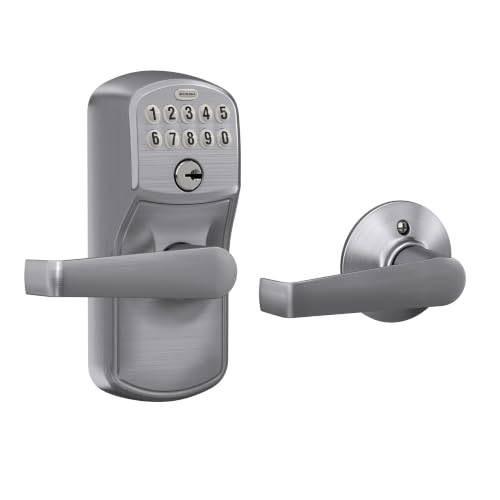
- Relocks automatically after five seconds
- Grade 2/AAA-rated metal construction
- Illuminated keypad and screwdriver installation
Best For: Light-commercial doors needing simple auto-locking
Light-Commercial Flexibility

- Keypad entry with Flex-Lock functionality
- Zinc construction with satin-chrome finish
- Includes hardware and installation instructions
Best For: Basic light-commercial keypad retrofits
Best Commercial-Grade Pick – Lockly Guard Latch PGD679L
For businesses comparing commercial smart locks for businesses, the Lockly Guard Latch stands out when fire-door certification, centralized administration, and multiple credential types matter. Its built-in Wi-Fi, LocklyOS compatibility, and commercial-grade metal construction support access management across busy facilities.
Best For: Offices, multi-building properties, and commercial doors requiring fire-rated certification and flexible credentials.
Pros:
- UL10B and UL10C certified, with NFPA 252 and FBC fire-door standards noted.
- Remote management through built-in Wi-Fi, the Secure Link Wi-Fi Hub, and LocklyOS.
- Supports PINs, fingerprints, RFID cards and fobs, eKeys, and eBadges.
- ADA compliant, IP54 weatherproof, and field-reversible for either handing.
Cons:
- RFID support for up to 999 cards and fobs requires a LocklyOS subscription.
- Uses four AA batteries rather than hardwired power.
- Its latch format may not suit doors requiring a different locking device.
This is the strongest fit for organizations that need more than basic app control. Verify door thickness, backset, and fire-door requirements before installation, then consider the subscription implications if you need large-scale RFID management.
Best Hub-Free Option – Philips WiFi Keypad Deadbolt
The Philips WiFi Keypad Deadbolt is a practical choice for smaller businesses seeking commercial smart locks for businesses without adding a separate hub. It connects directly to 2.4GHz Wi-Fi and combines remote app control, temporary codes, fingerprints, and a matching handle set.
Best For: Small offices, rental spaces, and low-complexity entry doors that are within range of a 2.4GHz router.
Pros:
- Built-in Wi-Fi provides remote control without an additional hub or bridge.
- Supports permanent, one-time, periodic, and recurring PIN codes.
- Offers fingerprint access, real-time access history, and adjustable auto-lock timing.
- Includes a matching handle set and is designed for screwdriver installation.
Cons:
- Wi-Fi operation requires a 2.4GHz router within about 33 feet and with limited interference.
- Batteries are not included, and the instructions specify standard 1.5V alkaline batteries.
- It is designed for doors 1-3/8 to 1-3/4 inches thick and requires resetting for left-opening doors.
Choose this model when straightforward installation and hub-free remote access are priorities. Its stated six-month battery life and residential-oriented feature set make it better suited to lighter-duty business access than high-traffic commercial deployments.
Best for Multi-Property Access – RemoteLock 5500
The Lockstate RemoteLock 5500 is designed specifically for commercial environments, making it a strong contender among commercial smart locks for businesses managing offices, retail locations, warehouses, or multi-family properties. Built-in Wi-Fi, Bluetooth, and RemoteLock software support both online administration and offline access workflows.
Best For: Property owners and facility managers needing varied credentials across multiple commercial door types.
Pros:
- Supports PINs, temporary guest PINs, ReadyPINs, MIFARE cards, and BLE mobile credentials.
- Built-in Wi-Fi connects directly to existing networks, while Bluetooth supports nearby administration.
- ReadyPINs provide an offline access option where internet service is unreliable.
- Non-handed, field-reversible design fits doors from 1-3/8 to 2-3/8 inches thick.
Cons:
- The medium-duty model weighs 7.90 pounds and may be more substantial than needed for light-duty doors.
- Networked management depends on suitable Wi-Fi coverage and the RemoteLock app or web platform.
- Credential and locking-device choices may require planning for the specific door application.
Among these options, the RemoteLock 5500 offers one of the clearest commercial access-control orientations. Its broad credential support and offline ReadyPIN capability are especially useful for distributed properties, but confirm the supplied backset, strike, and preferred cylindrical, exit-trim, or mortise configuration before ordering.
Best Familiar Brand Option – Schlage Encode Smart WiFi Lever
The Schlage Encode Smart WiFi Lever offers familiar app-based control for buyers considering commercial smart locks for businesses with relatively straightforward access needs. Built-in Wi-Fi enables remote locking, access-code management, history, and notifications, while its reversible lever and screwdriver installation simplify replacement on compatible doors.
Best For: Small offices, managed spaces, or business owners prioritizing simple installation and well-known app features.
Pros:
- Built-in Wi-Fi supports remote control, lock history, notifications, and management of up to 100 codes.
- Includes a customizable alarm for door movement and forced-entry attempts.
- Reversible lever fits right- and left-handed doors and supports two backset sizes.
- Works with Alexa, Google Assistant, Ring, and Airbnb according to the supplied details.
Cons:
- Its stated fit is limited to standard doors 1-3/8 to 1-3/4 inches thick.
- The product details describe residential BHMA certification rather than a commercial-grade rating.
- Wi-Fi features depend on connection to a secure network and the Schlage Home app.
This is a sensible option for lighter-duty business doors where easy setup, remote visibility, and code management matter more than specialized commercial credentials or fire-door certification. For high-traffic or regulated applications, compare its ratings and door compatibility with a purpose-built commercial model.
High-Traffic Keypad Pick – Kwikset SmartCode 955 Kingston
For businesses seeking commercial smart locks for businesses without app or internet dependence, the Kwikset SmartCode 955 Kingston combines keypad access with Grade 2 BHMA certification. Its 30-user-code capacity, long stated battery life, and high-cycle testing make it a practical option for busy interior or entry doors.
Best For: Small businesses, public restrooms, storage areas, and other high-traffic entryways needing managed keypad access.
Pros:
- Supports up to 30 user codes, one temporary code, and a programming code.
- Tested to 500,000 cycles and Grade 2 BHMA certified for security, durability, and finish.
- Offers a stated three-year battery life, illuminated keypad, auto-lock, passage mode, and tamper alert.
- Installs with a screwdriver and includes SmartKey re-keying capability.
Cons:
- Access is managed through keypad codes rather than a phone app or remote connection.
- Uses a lever format, so compatibility with the existing door hardware should be checked.
The Kingston is a strong fit when straightforward code management and physical durability matter more than connected controls. Its lock modes and temporary-code support add useful flexibility for shared business spaces.
Offline NFC Access Pick – Hermit Commercial Lever Lock
RFID Commercial Lever Door Lock, Access Control System App, Includes 2 NFC keycards (Right-Hand)
Check Price On AmazonAmong commercial smart locks for businesses, the Hermit Lock stands out for phone-based NFC access without an internet connection. It supports phone unlocking, NFC stickers, and app-managed keycards and guests while retrofitting to existing doors without wiring or recurring fees.
Best For: Small and medium-sized businesses, property managers, rental properties, independent hotels, and other sites wanting local access control.
Pros:
- Unlocks with a phone, NFC sticker, or supplied NFC keycards.
- App supports user and guest management and keycard creation.
- Does not connect to the internet, helping keep access local.
- Commercial-grade design can retrofit existing doors without wiring or recurring fees.
Cons:
- Right-hand configuration may limit suitability for some doors.
- NFC access depends on compatible phones, stickers, or keycards rather than a keypad.
- Because it is offline, it does not provide internet-based remote access.
The Hermit Lock is appealing for organizations that want app-assisted credential management while avoiding cloud connectivity. Confirm door handing and NFC workflow requirements before choosing it for a larger installation.
Traditional Keypad Value Pick – Kwikset SmartCode 955 Pembroke
The Kwikset SmartCode 955 Pembroke is a practical choice for businesses comparing commercial smart locks for businesses with a traditional lever appearance. It provides code-based entry, 30-user-code management, auto-lock and passage modes, and high-traffic durability without requiring a connected app.
Best For: High-use business entryways and interior doors where dependable keypad access and a traditional style are priorities.
Pros:
- Stores up to 30 user codes, one one-time code, and one programming code.
- Tested to 500,000 cycles and Grade 2 BHMA certified for security, durability, and finish.
- Provides a stated three-year battery life, backlit keypad, auto-lock, and passage mode.
- Alarm and one-minute keypad lockout respond to three consecutive incorrect entries.
Cons:
- Does not offer app control, NFC access, or internet connectivity.
- The traditional Pembroke styling may be less suitable where a contemporary appearance is preferred.
The Pembroke delivers the core commercial features many businesses need at the door: shared codes, automatic locking, and high-cycle testing. It is best suited to installations where local keypad control is sufficient and the traditional design fits the space.
Flexible Standalone Access – Hicarer Commercial Keypad Lever Lock
For businesses seeking commercial smart locks for businesses without Wi-Fi fees or app setup, the Hicarer provides three entry methods: keypad code, access card, and backup key. Its standalone battery operation suits shared office, apartment, and warehouse doors, provided your existing door matches the required measurements.
Best For: Shared interior or commercial doors that need flexible code, card, and key access without networking.
Pros:
- Offers password, access-card, and backup-key entry.
- Stores and manages codes directly on the lock, with no Wi-Fi, subscription, or account.
- Reversible lever works with left- or right-handed doors.
- Includes the lock, cards, keys, screwdriver, and mounting hardware.
Cons:
- Requires a 1.18–2.36-inch-thick door, 2.36-inch backset, and 2.17-inch bore hole.
- Odd door cutouts may require drilling.
- Battery-powered operation has no stated network-based management feature.
The Hicarer is a practical choice when multiple entry options matter more than remote administration. Measure the door carefully before ordering, especially for retrofit installations.
Automatic Relocking – Schlage Camelot Keypad Lever Lock
The Schlage Camelot keypad lever is a straightforward option for commercial smart locks for businesses that prioritize automatic relocking and easy retrofit installation. Its Grade 2/AAA-rated construction is intended for residential and light commercial use, while the illuminated keypad supports code entry in low light.
Best For: Light-commercial doors where automatic five-second relocking and simple keypad access are priorities.
Pros:
- Automatically relocks five seconds after a code is entered.
- Metal construction and Grade 2/AAA security rating support durability.
- Illuminated, silicone-coated keypad is easier to use in the dark.
- Installs over an existing lever or knob with a screwdriver and no hardwiring.
Cons:
- Specified for residential and light commercial applications rather than heavier commercial use.
- Uses a 9V battery, so battery replacement remains part of maintenance.
- Typical battery life is stated as up to two years, depending on use.
Choose this Schlage when dependable local keypad entry and automatic relocking are more important than connected features. Its retrofit-focused design can simplify installation on compatible existing hardware.
Light-Commercial Flexibility – Schlage Plymouth Keypad Lock
For buyers comparing commercial smart locks for businesses, the Schlage Plymouth FE595 offers keypad entry in a light-commercial format with Flex-Lock functionality. Its satin-chrome finish, metal construction, and included installation hardware make it suited to straightforward door upgrades where local keypad access is sufficient.
Best For: Light-commercial doors needing a durable keypad entry lock with Flex-Lock operation.
Pros:
- Provides keyless keypad entry with a Plymouth trim and Elan lever.
- Flex-Lock functionality supports selectable locking behavior.
- Includes installation hardware and instructions.
- Metal zinc construction and satin-chrome finish suit routine use.
Cons:
- Described as light commercial, so it may not fit heavy-duty commercial requirements.
- Supplied notes do not specify remote access, Wi-Fi, or app control.
- The notes provide limited information about battery life and installation requirements.
This Schlage is a sensible fit for a basic keypad retrofit when Flex-Lock control and a familiar lever design are useful. Confirm the door and existing hardware compatibility before purchase.
How We Picked the Best Commercial Smart Locks for Businesses
We focused on access methods, commercial suitability, installation practicality, power requirements, connectivity, and stated durability or certification. The selection includes connected locks for remote management, standalone keypad models for simpler deployments, and RFID or biometric options for workplaces that need faster credential-based entry.
We also considered whether each lock is better suited to interior offices, low- to moderate-traffic commercial doors, rentals, storage areas, or primary entrances. Always verify the door thickness, backset, handing, fire-rating requirements, and local code requirements before ordering.
Quick Comparison
| Best for | Look for | Typical advantage |
|---|---|---|
| Remote management | Built-in Wi-Fi or a compatible hub | Manage credentials and entry from an app |
| Simple employee access | Keypad lever with user codes | No keys, cards, or recurring connectivity required |
| Credential-based entry | RFID or NFC support | Fast access for staff with assigned cards |
| High-convenience entry | Fingerprint, PIN, or multiple methods | Flexible access for varied users |
| Budget deployments | Standalone electronic keypad | Lower complexity and easier installation |
Key Buying Factors for Commercial Smart Locks for Businesses
Access Control and Connectivity
Decide whether you need remote unlocking, temporary codes, activity notifications, or centralized management. Wi-Fi models can provide these features directly, while standalone locks generally keep access local and continue working without internet service. For multiple locations, confirm whether the app supports separate properties, user roles, and credential removal.
Door Compatibility and Security
Check the lock type, backset, door thickness, handing, strike alignment, and lever clearance. A residential-style deadbolt may not suit a commercial lever door, while a light-commercial lock may be inappropriate for heavy daily traffic. Fire-rated openings require products and installation practices that preserve the door assembly’s rating; certifications such as UL listings should match your application.
Power, Maintenance, and Backup Entry
Battery life varies with traffic, wireless use, and weather exposure. Choose a model with clear low-battery warnings and a practical emergency power or mechanical-key option. Businesses should also plan how administrators will replace batteries, recover access, and deactivate former employees promptly.
Usability and Compliance
Large buttons, visible status indicators, lever operation, and ADA-related design details can improve accessibility. Confirm that the complete installed opening—not just the lock—meets applicable accessibility, egress, and building-code requirements.
Who Should Buy Which Commercial Smart Locks for Businesses?
Choose a Wi-Fi-enabled lock if managers need remote control, temporary credentials, or notifications. Pick a standalone keypad lever for an office, utility room, or small business that wants reliable keyless entry without monthly software dependence. RFID or NFC models are a good fit where staff already use cards or badges, while fingerprint-capable locks can reduce shared-code use when biometric access is appropriate.
For high-traffic entrances, prioritize commercial ratings, reinforced hardware, documented certifications, and professional installation over extra app features. For interior rooms and moderate-use doors, a simpler keypad lock may deliver the best value. Before buying, compare the total cost of hardware, batteries, hubs, software subscriptions, replacement credentials, and installation—not just the purchase price.